
Field notes
Collection Architecture: Merchandising a 500-SKU Catalogue
July 28, 2026

A skincare brand doing $9M a year came to us with a familiar shape of problem. Four years of launches had produced 520 live SKUs across serums, cleansers, masks, refills, minis, and travel sets. Site-wide conversion rate was flat year on year while paid traffic costs kept climbing. The obvious suspects were all clean: the PDP had been rebuilt twice, checkout was on the current extensibility stack, email was well segmented.
The problem was one screen upstream. Their largest collection, "Skincare", held 340 products, sorted by newest, with four filters: price, availability, product type, vendor. Vendor was pointless because they were the only vendor. Product type mirrored their internal accounting taxonomy, so a shopper looking for a retinol had to already know whether the company classified it as a "treatment" or a "serum". Session recordings showed people paginating to page four, then leaving.
Nothing was broken. Every part of it had been built correctly at some point, by someone who was solving that week's problem. That is what collection architecture failure looks like at scale: not a bug, an accumulation.
TL;DR
- Product list quality is a conversion input, not a design preference. In Baymard's testing, sites with mediocre product list usability saw 67-90% abandonment while lightly optimized ones saw 17-33% for the same finding tasks.
- Most catalogues are structured around internal taxonomy (how the finance team groups SKUs) rather than shopper language. That single mismatch does more damage than any filter UI detail.
- The collection-versus-filter decision is the expensive one. Collections are merchandisable and indexable; filters are cheap and disposable. Getting this backwards creates either a thin-collection graveyard or an unnavigable mega-grid.
- Shopify's free tooling has hard ceilings (25 filters per store, 60 conditions per smart collection, 250 products per paginated page). Know them before you design, not after.
- Sort order and inventory-aware ranking decay silently. They need a named owner and a monthly slot, or the structure rots within two quarters.
The failure mode is arithmetic, not taste
At 50 SKUs, structure barely matters. Anyone can scan 50 products. At 500, the shopper is doing a filtering job, and the site either helps or does not.
Baymard's 2025 benchmark of 170+ leading US and European sites found 58% of desktop sites and 78% of mobile sites have mediocre or worse product list implementations. The same research programme found abandonment rates of 67-90% on sites with mediocre product list usability, against 17-33% on sites with a slightly optimized toolset, for users trying to find the same types of product. That is not a rounding error on your conversion rate. It is the difference between a paid channel working and not working.
The specific gaps are unglamorous. In that benchmark, 51% of sites do not offer all five essential filter types (price, ratings, colour, size, brand), 68-69% lack all four essential sort types, 20% do not show applied filters in an overview, and 14% still do not let shoppers select multiple values within the same filter. None of these require a replatform. All of them require someone to own the decision.
Navigation above the grid is in similar shape. Baymard's 2025 homepage and category navigation benchmark found 60% of sites do not divide categories into manageable chunks and 76% of intermediary category pages do not feature subcategories as their primary content. Their working thresholds are useful anchors: subdivide once a level reaches around ten children, and aim for at least ten products at the deepest level.
The spine: three levels, and what each one is for
For a 500-SKU catalogue, three levels is almost always right. Four is a symptom of a merchandiser trying to encode a spreadsheet.
- Level 1, department. Five to eight entries. These are the nav items. They exist to route, not to sell. Their job is to be unambiguous to a first-time visitor.
- Level 2, category. The commercial unit. This is where you merchandise: intro copy, hand-picked ordering, hero products, editorial modules. Most of your ad traffic and organic entry should land here.
- Level 3, refinement collection. Narrow, high-intent, at least ten products. "Retinol serums", "fragrance-free cleansers", "travel sizes under $25". These are the ones people actually type into search boxes.
Anything narrower than that is a filter value, not a collection. A collection holding three products is a bad landing page, a thin URL, and a maintenance liability.
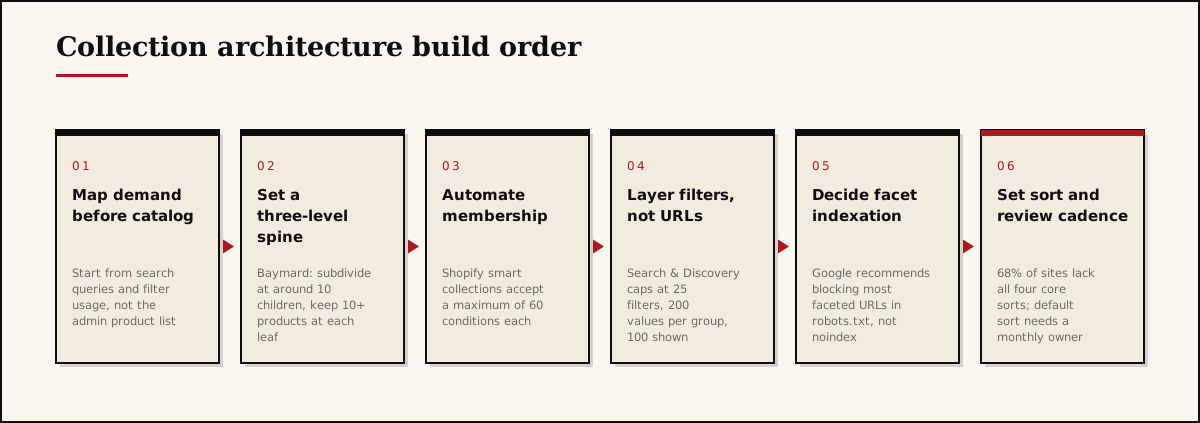
The build order matters more than the diagram makes it look. Teams almost always start at step three, in the Shopify admin, because that is where the buttons are. Starting there guarantees the structure inherits the internal taxonomy. Start instead with the demand data you already own: internal site search terms with zero or poor results, Search Console queries landing on collection URLs, and the filter values shoppers combine most often. That last one is the highest-signal input in the whole exercise and almost nobody looks at it.
Collections or filters: the decision that costs the most money
Every attribute in your catalogue is either a collection, a filter, or nothing. Deciding case by case, in the moment, is how stores end up with 180 collections and four useful ones.
| Attribute behaves like this | Make it a | Why |
|---|---|---|
| People search the phrase standalone ("retinol serum") | Collection | Deserves copy, curation, and an indexable URL |
| You want to run paid traffic or email to it | Collection | Needs a controllable landing experience |
| It is seasonal and recurs ("holiday gifting") | Collection | Reusable, merchandised, worth the annual effort |
| It refines an existing browse ("under $40", "unscented") | Filter | Combinatorial, cheap, no standalone demand |
| It has fewer than ten qualifying products | Filter or nothing | A thin collection converts worse than no collection |
| It exists for ops or finance reasons (margin band, supplier) | Nothing customer-facing | Use tags and metafields internally |
Shopify's automated collections make the collection side cheap to run, with one constraint worth knowing before you design: a smart collection accepts a maximum of 60 conditions. If a collection needs more than 60, the taxonomy underneath it is wrong. Build the attribute into a metafield and use one condition instead of twenty tags.
On the filter side, Shopify Search & Discovery is free and covers most of what a $2M-$20M brand needs, but the ceilings are real: 25 filters per store, 200 unique values per filter group, 100 values displayed on the storefront, and filters hidden entirely on collections above 5,000 products. The 25-filter cap is store-wide, not per collection, which surprises people. If apparel needs size, inseam, fit, fabric, and rise while skincare needs skin type, concern, texture, and format, you burn through the allowance faster than you expect.
One more structural limit: Liquid's paginate tag accepts between 1 and 250 items per page and cannot reach past the 25,000th item in an array. At 500 SKUs you will never hit the ceiling, but the 250 cap quietly kills the "just load everything and let them scroll" approach that gets proposed in every one of these projects.
Sort order is a merchandising decision nobody owns
Default sort is the single most influential merchandising lever on the site, and in most stores it was set once by whoever installed the theme.
Alphabetical is never right. Newest is right only for a launch-driven catalogue where recency genuinely predicts interest, and even then only for the first few weeks. Best-selling is the sensible default for evergreen categories, with one large caveat: best-selling is backward-looking, so it entrenches whatever you merchandised last quarter and buries new products that never got a chance to sell.
The pattern that holds up: a manually curated head of six to twelve products, then automated ranking for the tail. The head is where you place new launches, high-margin lines, and the products that answer the category's most common objection. The tail sorts by units or revenue over a rolling 60 to 90 days.
Then make it inventory-aware. Products that are sold out, low-stock, or missing the shopper's likely size should sink. This is the highest-ROI merchandising rule most brands are not running, because it converts a dead click into a live one at zero acquisition cost.
What the tools actually do, and what they cost
| Tool | Price | Best for | Wrong choice when |
|---|---|---|---|
| Shopify Search & Discovery | Free | Almost every brand under $20M starting from scratch | You need more than 25 store-wide filters, in-collection search, or rules-based merchandising campaigns |
| Boost AI Search & Filter | Launch from $29/mo (to $159 under $50K GMV); Convert from $299/mo (to $599 under $400K GMV); Accelerate from $699/mo | Deep attribute filtering, multiple filter trees per collection, merchandising campaigns | Your catalogue attributes are thin. The app cannot filter on data you have not modelled |
| Athos Commerce, formerly Searchspring | Quote-based, three discovery tiers | Large or multi-region catalogues where search relevance is the growth constraint | You are buying it to fix 500 SKUs. This is enterprise discovery tooling and the implementation cost exceeds the app cost |
| Rebuy | Free Monetize tier; build-your-own from $25/mo; Platform One at $534/mo | Recommendation widgets and cross-sell inside and beside the grid | You are treating recommendations as a substitute for structure. They are a complement |
The pattern we see repeatedly: brands buy a $299/month discovery app to avoid three weeks of taxonomy work, then run it on the same messy tags. The app surfaces the mess faster. Attribute data quality is the input; tooling is the multiplier. A multiplier on zero is zero.
Metafields are the unglamorous answer. Model attributes properly (skin concern, fabric, fit, occasion) as metafield definitions rather than free-text tags, and both your free filters and any paid app you buy later get better simultaneously.
The indexation question you cannot defer
Every filter combination is a potential URL, and 500 SKUs with eight filters generates more URL permutations than your entire product catalogue. Google's crawling documentation is direct about this: prevent crawling of faceted URLs you do not need indexed, using robots.txt as the primary mechanism, with canonical tags described as a weaker long-term option and nofollow the least effective. It also recommends returning a 404 for filter combinations with no results, rather than redirecting to a generic page.
The practical policy for a catalogue this size: promote the ten to twenty highest-demand facet combinations into real, merchandised collections with their own copy, and block the rest. That gives you indexable pages where demand exists and no crawl waste where it does not. We covered the on-page side of this in Shopify collection page SEO; the point here is that the decision belongs in the architecture phase, not in a cleanup project eighteen months later.
Governance: the part that decides whether any of this survives
Collection architecture does not fail at launch. It fails through inventory drift, launches added to the wrong parent, and seasonal collections nobody archived.
| Cadence | Task | Owner |
|---|---|---|
| Weekly | Pull zero-result and poor-result internal search terms; add synonyms or products | Merchandiser |
| Weekly | Sink sold-out and low-stock products in default sort | Automated rule, spot-checked |
| Monthly | Review collections with fewer than ten products; merge or convert to filters | Merchandiser |
| Monthly | Check the curated head of the top ten collections against current margin and stock | Merchandiser plus buying |
| Quarterly | Audit filter usage; remove filters under 2% engagement, add ones shoppers combine manually | Growth or agency |
| Seasonally | Archive expired seasonal collections and redirect | Whoever owns SEO |
Two rules make this stick. Every new collection needs a named owner and a review date at creation. And no collection ships without answering what a shopper would type to get here.
Our take
The conventional advice is to invest in better search and discovery tooling as the catalogue grows. We think that is backwards for most brands in the $2M-$20M band, and the mechanism is straightforward.
Discovery software ranks and filters based on the attributes you have modelled and the behavioural signal you have accumulated. At 500 SKUs and the session volumes typical of an $8M brand, the behavioural signal on any individual product is thin. A personalization engine dividing a few thousand monthly sessions across 500 products and dozens of segments is making decisions on samples too small to be reliable. Meanwhile, the attribute data it depends on is usually a pile of tags that three different people created over four years.
So the sequence that actually works is: fix the taxonomy, model the attributes as metafields, structure three clean levels, set an inventory-aware sort with a curated head, and only then evaluate whether a paid discovery layer beats what you have. Most brands find that after the first four steps, the free tooling is sufficient and they have redirected $3,600 a year of app spend into something with a clearer return.
The second position we will defend: hand-curated merchandising outperforms algorithmic ranking at this catalogue size, and it does so for a structural reason. A merchandiser knows the new launch has three weeks of inventory, that the hero product carries 68% margin, and that the category's top objection is sensitivity. No ranking model has that information. Algorithmic ranking wins at 10,000 SKUs where human attention cannot cover the catalogue. At 500 SKUs, the top twelve slots of your twenty most-trafficked collections is 240 decisions, which is one afternoon a month. That is the highest-leverage afternoon in your merchandising calendar.
Where we agree with conventional wisdom: do not hand-curate the tail. It will not be maintained, and stale manual ordering is worse than any automated rule.
What to do this week
- Export every collection with its product count. Anything under ten products gets merged, converted to a filter value, or deleted.
- Pull 90 days of internal site search terms and list every query returning zero or poor results. That list is your missing-collections backlog, ranked by demand.
- Check the default sort on your ten highest-traffic collections. If any are alphabetical or newest without a reason you can state out loud, change them to best-selling with a curated head.
- Audit your filters against the five essentials (price, ratings, colour or equivalent, size or format, brand) and confirm multi-select works within each filter type.
- Write the robots.txt facet policy before you touch anything else, and name the ten facet combinations worth promoting to real collections.
If your catalogue has grown past the structure that was designed for it, that is a solvable problem with a clear sequence, and it is usually cheaper than the paid media you are spending to work around it. Book a 30-minute call and we will walk your collection tree and filter set with you, or request a custom quote if you already know the shape of the work. If you would rather see the diagnosis first, our free audit covers structure, sort logic, and facet indexation.
Frequently asked questions
Usually between 25 and 60 live collections, arranged in three levels. The test is not the count but whether each leaf holds at least ten products and each parent has fewer than about ten children. Anything holding two SKUs should be a filter value, not a collection.
Make it a collection when people search for that phrase, when you want to merchandise it with copy and hand-picked order, or when you run ads to it. Make it a filter when it is a refinement inside a browsing session and nobody types it as a standalone query.
Rarely alphabetical or newest. For evergreen collections, a manual head of six to twelve hand-picked products followed by best-selling works well. For seasonal or launch collections, manual ordering is worth the effort for the first four weeks, then automate.
Not until you hit a real limit. Shopify Search & Discovery is free and caps at 25 filters per store and 100 displayed values per filter. Brands exceed those caps with deep attribute data, multi-collection merchandising rules, or in-collection search. Below that, paying is buying features you will not configure.
Decide indexation per facet before launch. Google recommends blocking most faceted URLs in robots.txt rather than relying on noindex, keeping a short allowlist of high-demand combinations as real collections, and returning 404 for filter combinations that produce no results.
One person, with a monthly review slot. Collection architecture decays through inventory drift, not through bad design. Without a named owner and a recurring cadence, sold-out and low-stock products creep back to the top of the grid within two quarters.
One-page resource
Get the Small Store Revenue Checklist.
The 12 things that actually move revenue on a store under $50K a month, in the order we'd fix them. Delivered to your inbox.